Posts

A Typical Day in my Life

Image
  5:00 am We're staying all night, we never slow down. I think we better do it like we like we doing it n-  I quickly switch off my alarm before I start hating the song. It's not always easy to get up at 5:00am, especially since the sun hasn't risen yet. However, I've been working remotely even before it became cool so I don't have to contend with a long commute. I reluctantly sneak out of bed and start with some daily meditation. Waking up early also gives me some time to continue writing. I have a lot of vivid dreams and I get a lot of content from my recorded dreams. Some of them are too bizarre to write down. You can read an example in Surreal Sartorial. 6:15 am I connect my  Just Dance  app to my PC and start dancing. It's my way of getting some early quick exercises whiles enjoying my favorite playlist. The Just Dance app tells me I've burnt 90kcal after dancing through my playlist. I have a feeling it's not accurate, but it pleases me nonetheless....

Designing an mobile system with Gprc + Elixir

Image
Incorporating gRPC + Elixir in Mobile Application We want to be able to use the gRPC framework to make a remote procedure call. Basically, it is a way that allows our mobile clients to directly make requests from the mobile app server without being able to receive all the network details locally. There are lots and lots of use-cases for incorporating gRPC and Elixir, see Use Cases for some examples about how it could be used.  Use Cases # User(s) Use-case 1 Mobile Server Inter-microservice communication 2 Client Request Aggregate data from multiple microservices  3 Mobile Server Creating users 4 Client Request Fetching users System Design Decisions for consideration What exactly do we expect the mobile app to fetch from the server endpoints? Which microservices have we decided at this point in time to make provision for in our mobile app infrastructure? What problem does the decision to use Elixir as a programming language solve? Are merchant and client authentication handled...

Two Birds one Hill

Image
They see birds on the hill. Belly-up with their heads turned sideways. The fact that the birds litter the side of the mountain is unsurprising. The air is heavy here, all the smog from the smouldering boulders ascend and hover over the mountains like a shroudlike-like drapery. Occasionally, you can see some of the birds twitch.  Today is a Monday, or what they choose to call Monday. The fact is, they have lost track of the days. Tracking the days has been relegated for more pressing needs. Foraging for edible plants, nuts, you know making sure you stay alive. That kind of stuff. They choose to call most days Mondays, after all everybody hates Mondays. With the dreary fog covering the whole landscape, time in itself has been abandoned long ago in the meaningless struggle for survival. The days are all gloomy on the hillside, days of climbing and foraging, they choose to call Thursday, days of rest and little activity, they call Monday. There aren't many Fridays. He is dizzy from chr...

Writing Automated Tests with Kotlin

Image
Kotlin is a programming language that has been abstracted to the point that it can read like plain English. Kotlin helps a lot of devs tp easily refactor their whole codebase and maintain the code much more easily. Learning Kotlin is like learning any other programming language. You need to understand the syntax and also know some exceptions. Once you are comfortable using Kotlin, you'll appreciate programming a lot more and write code with greater efficiency. You can get started by taking these exercises . We're going to go through writing android tests using Kotlin. Prerequisites 1. Install the Android Studio IDE or Intellij IDE. One of the things to do to start, 2. Enable offline builds by clicking on the Toggle offline mode button.  3. Switch to feature/Clipboarde2e branch  4. Run  npx react-native bundle --platform android --dev true --entry-file index.js --bundle-output android/app/src/main/assets/index.android.bundle --assets-dest android/app/src/main/res/ 5. Open ...

What makes the most boring game fun to play

Image
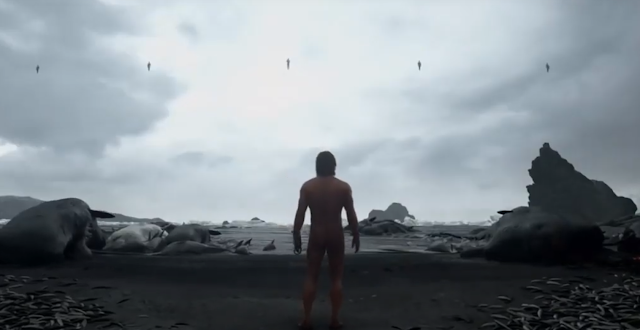
    Death Stranding is an open-world game with beautiful landscapes set in a post-apocalyptic America. The game's design forces you to manage every single resource. You need to arrange each tool and equipment, carry weapons, go number one and number two by yourself. The player also needs to plan each step they take as they traverse the world. I mean step literally, as in left foot forward, right foot forward. You can also look into the mirror with your character and admire your face. I'm pretty sure no one asked for that feature. In short, DS is a walking simulator with a really weird story. The main campaign can easily take you more than 40 hours to complete. But damn the game is so boring. DS is accurately described as a walking simulator. Despite all of this, a legit argument can be made that DS is a masterpiece. There are many awesome video games and I think DS also belongs on the Mt. Rushmore of videogames.     The  Death Stranding  is a cataclysm...

Linux Shell Tools to make your daily life easier

Image
       There is a reason why most of us are more comfortable using Windows and other graphical user interfaces. Interaction with digital objects comes naturally. But what if you land your first job and you are required to get comfortable in the terminal as soon as possible? Or do you find yourself in a situation where you cannot use a computer mouse for some time?  I am putting together a comprehensive introduction to how adjusting to living in the terminal is like. I want to introduce some indispensable tools every shell scripter uses. What does it mean to live in the terminal? A lot of operating systems have graphical user interfaces. Of course, GUIs are beautiful and interactive but developers need to be as productive as possible. Living in the terminal means being able to execute your workflow right from the terminal with minimal use of the mouse. To start living in the terminal, you should get comfortable using vim as your default editor. Using nano is ok, ...

Troubleshooting in the shell

Image
  How to resolve commonly faced issues The purpose of this guide is to provide some guidance to troubleshooting some recurring issues on the development server. Possible trouble areas Frontend  Git workflows Voice Telephony Development servers Everything is logged on a development server so as a general rule of thumb always check logs if there are any to assist in finding a solution. For example, if it is a PHP log, it is likely to be found here: /usr/local/apache/logs/error_log Frontend Let’s say that you’re unable to access the web page due to a “Whoops Error”. There could be a number of reasons. If the stack trace includes [STALE WEBPACK-MIX ASSETS], running  yarn install --check-files && yarn prod  on the development server will safely bring the web app back.  What actually happens Yarn will fetch and rebuild the web assets and you should be able to use the web application afterwards. What if you’re still unable to access the web app? Sometimes p erf...